
Nhà cung cấp Tên miền, Hosting Uy Tín. Hỗ trợ 24/7

Hướng dẫn kích hoạt AutoSSL trên Hosting WordPress và Hosting Linux

Lượt xem: 776 Thảo Luận: 2

     Xin chào các bạn, trong bài viết này BKHOST sẽ hướng dẫn bạn kích hoạt AutoSSL trên gói Hosting WordPress (tương tự với Hosting Linux) sau khi cài đặt, thứ tự thao tác như sau:

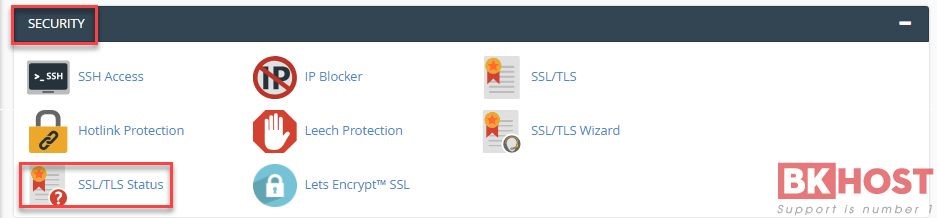
     Bước 1: Bạn đăng nhập tài khoản hosting trên cPanel và chọn mục “SSL/TLS Status” như hình bên dưới.
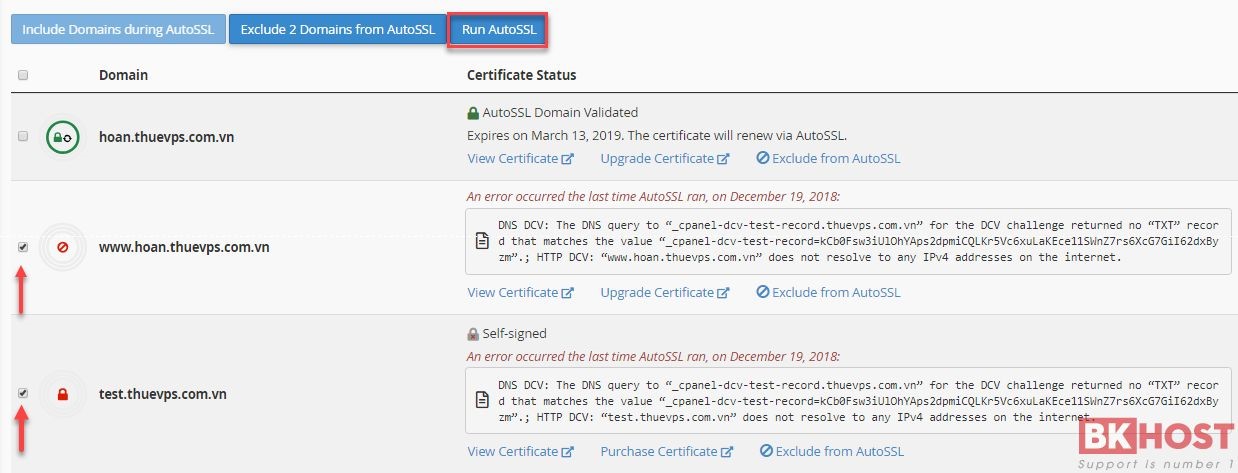
     Bước 2: Tại giao diện SSL/TLS Status bạn tick vào domain cần sử dụng SSL Let’s Encrypt sau đó chọn “Run AutoSSL

     Bạn chờ cho đến khi quét xong sẽ nhìn thấy thông báo AutoSSL Domain Validated, tức là đã kích hoạt Let’s Encrypt xong và có thể sử dụng https, nếu gặp khó khăn gì trong quá trình sử dụng dịch vụ, bạn vui lòng liên hệ Phòng Kỹ Thuật của BKHOST để được hỗ trợ.

     Chúc bạn thành công!

 

Tags: , ,

Bình luận

betasus güncel giriş betasus giriş betasus betasus hiltonbet güncel giriş hiltonbet giriş hiltonbet betturkey güncel giriş betturkey giriş betturkey betturkey betparibu güncel giriş betparibu giriş betparibu jojobet güncel giriş jojobet giriş jojobet jojobet meritking güncel giriş meritking giriş meritking meritking güncel giriş meritking giriş meritking meritking güncel giriş meritking giriş meritking meritking güncel giriş meritking giriş meritking hiltonbet güncel giriş hiltonbet giriş hiltonbet matbet güncel giriş matbet giriş matbet sahabet güncel giriş sahabet giriş sahabet sahabet smartbahis güncel giriş smartbahis giriş smartbahis smartbahis betcio güncel giriş betcio giriş betcio pradabet güncel giriş pradabet giriş pradabet betvole güncel giriş betvole giriş betvole limanbet güncel giriş limanbet giriş limanbet sahabet güncel giriş sahabet giriş sahabet sahabet lunabet güncel giriş lunabet giriş lunabet lunabet lunabet güncel giriş lunabet giriş lunabet lunabet restbet güncel giriş restbet giriş restbet betebet güncel giriş betebet giriş betebet perabet güncel giriş perabet giriş perabet